Open a shared checkout link
The Checkout app (printbazar-checkout) opens classic Customer Link URLs. Path only — no query parameters: /{pos-slug}/{link-code}.
Production example: https://store.novaorder.in/{pos-slug}/{link-code}. Local: http://localhost:3002/.... Catalog browse URLs on the POS host are a different product — Create a curated catalog link.
Customer
- Open the exact URL the shop sent. Do not edit the path.
- Wait for Loading your order.... The browser title becomes
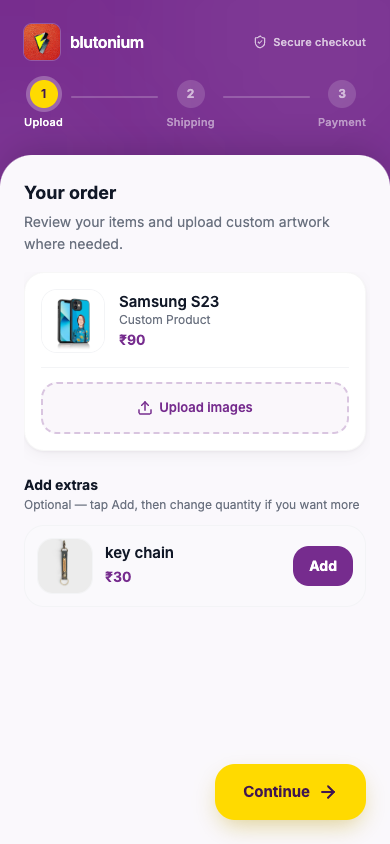
{shop name} - Checkout. - If the link status is Empty, you enter the three-step wizard: Upload → Shipping → Payment.
- If the link is already submitted (or later statuses), you go straight to the success / tracking screen — chat and design approval live there.
If the link fails
| Situation | What you see (examples) |
|---|---|
| Bad or incomplete URL | Invalid link. Please check the URL. / This checkout link isn’t on the press |
| Link archived / gone | Messages such as This link is no longer available. or This checkout link was already used / This order is no longer available |
| Temporary server problem | Something jammed on the press — use Try again when offered |
Ask the store for a new link if yours is invalid or no longer available.
Progress on the device is saved under keys prefixed with checkout_{link-code}_ (step, uploads, shipping, payment proof, add-ons). Completing the order clears that local data.
Staff
Create and copy links from POS Link History — Create and share. Confirm the copied host matches Checkout (VITE_CHECKOUT_BASE_URL / store.novaorder.in), not a catalog path under /catalog/.
Related
- Technical: Checkout internals — wizard steps and localStorage
- Technical: Customer link lifecycle — statuses and conversion